Creating a Baba Option account is free and takes about five minutes. This guide shows each screen of the Baba Option sign up process, explains the password rules that trip many people up, and covers the login options and fixes for common login problems.
Risk warning: binary options are high-risk products and most retail traders lose money. Only trade with money you can afford to lose. This page is for information only and is not financial advice.
Sign up in 5 steps
- Click Sign Up on the official website, or use Google, Apple, Facebook or LINE.
- Choose your country, enter your email and the code sent to you (valid for 15 minutes).
- Type your legal name exactly as on your ID.
- Create an 8–15 character password with upper and lower case letters, a number and a symbol.
- Accept the terms, confirm you are 18+, and log in to the Client Portal.
What You Need Before You Start
| Requirement | Details |
|---|---|
| Age | 18 or older |
| An inbox you can open now (for the verification code) | |
| Phone | A mobile number for SMS verification |
| Documents (later) | ID plus proof of address for KYC |
| Country | Not USA, Canada, EEA, China, Iran, Iraq, North Korea or other restricted regions |
| Cost | Free |
Step-by-Step: The Registration Form
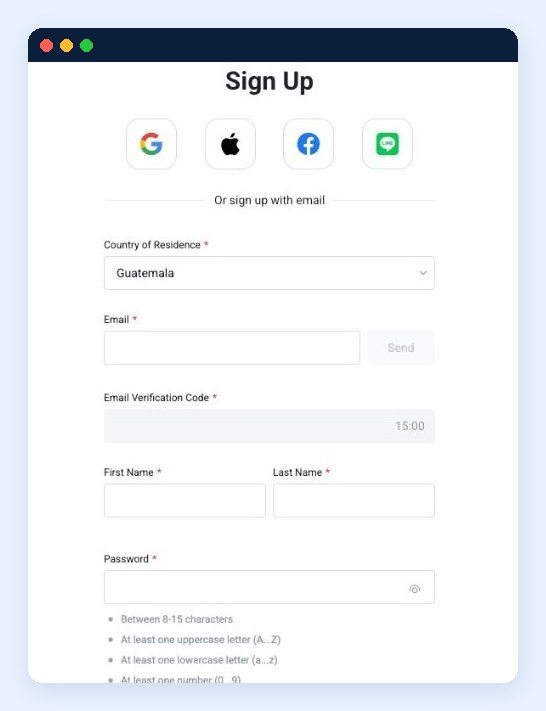
Step 1: Choose your country of residence
Pick the country where you live now. It decides which payment methods and promotions you see, so do not choose a different one.
Step 2: Verify your email
Enter your email, click Send and type the code you receive. The code expires after 15 minutes; if it does not arrive, check your spam folder and request a new one.
Step 3: Enter your legal name
Use your first and last name exactly as they appear on your passport or ID card. A mismatch is the most common reason for failed verification and rejected withdrawals later.
Step 4: Create a strong password
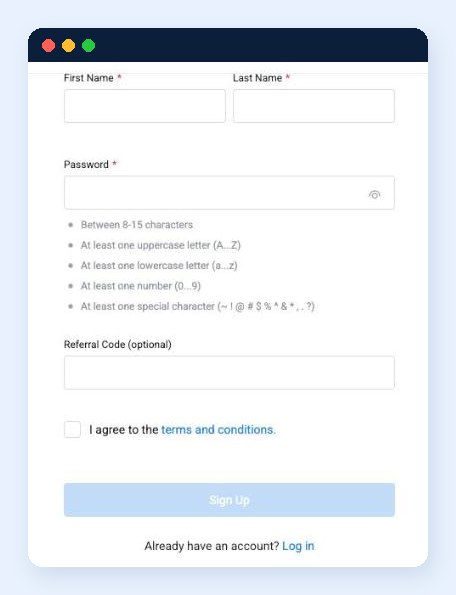
The form shows a checklist that turns green as you type. Your password must be 8–15 characters long and include at least one uppercase letter, one lowercase letter, one number and one special character. The Referral Code field below it is optional, and leaving it empty does not affect the deposit bonus.
Step 5: Accept the terms and submit
Tick the box confirming you are at least 18 and agree to the terms, then submit. You can now log in to the Client Portal.
After Registration: Open Your Trading Account
- In the Client Portal, click Open an Account.
- Verify your phone number if asked.
- Choose Live or Demo.
- Pick your main currency: USD, EUR, GBP, JPY, BTC, ETH, XRP, USDT or USDC.
- Confirm, then click Trade Now.
Want to practise first? Read our Baba Option demo account guide.
How to Log In to Baba Option
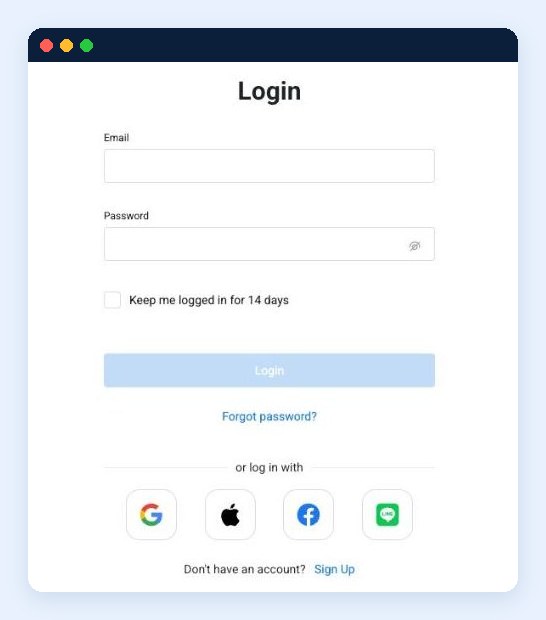
- Click Login at the top of the website.
- Enter your email and password, or use Google, Apple, Facebook or LINE.
- On your own device you can tick Keep me logged in for 14 days.
- Click Login, then Trade Now to open the platform.
Login Problems: Quick Fixes
| Problem | Fix |
|---|---|
| No email code | Check spam, wait a few minutes, then request a new code. |
| Forgot password | Click Forgot password? and follow the email link. |
| No SMS code | Check the country code and number, then resend. |
| iPhone web app will not log in | Open a live account first, turn off Request Desktop Website for Safari, then reopen the app. |
| Platform does not load | Clear cache and cookies or try a private window. |
Still stuck? Support is available 24/7 via live chat or at support@babaoption.com.
FAQ
Is it free to sign up for Baba Option?
Yes. Registration and the demo account are free.
What are the Baba Option password rules?
8 to 15 characters, with at least one uppercase letter, one lowercase letter, one number and one special character.
Do I need a referral code?
No. The referral code field is optional.
Can I sign up with Google or Apple?
Yes. Google, Apple, Facebook and LINE are supported, as well as email.
Affiliate disclosure: Baba Option Guide may earn a commission when you open an account through links on this page, at no extra cost to you. Facts were checked on the official websites in October 2026 and can change, so always confirm conditions before you trade. Binary options are not available in every country; see Investor.gov for an independent explanation of how they work.