This page is all about the software. Instead of covering bonuses or licences, we look at how the Baba Option platform, called BABA Trader, actually works when you use it: the order panel, expiries, the strike price, charts and multi-chart layouts, and the web, desktop and mobile versions. Everything below comes from our own session in the Baba Option Preview platform in October 2026. For the broker as a whole, read our full Baba Option review.
Risk warning: binary options are high-risk products and most retail traders lose money. Only trade with money you can afford to lose. This page is for information only and is not financial advice.
Key facts
- Name: BABA Trader (web terminal, desktop and mobile)
- Try it without sign-up: yes, via the Preview button ($10,000 virtual balance)
- Expiry: Timer from 5 seconds or Clock (exact closing time)
- Unique feature: custom strike price on Up & Down options
- Charts: layouts with 1, 2, 3, 4, 6 or 9 charts, indicators and drawing tools
- Our platform score: 4.4 / 5
First Look: The Trading Screen
Click Preview on the Baba Option website and the platform loads straight into a BTC/USD chart with a $10,000 virtual balance. You do not need an email address or a password, which makes it one of the easiest broker platforms to inspect before committing.
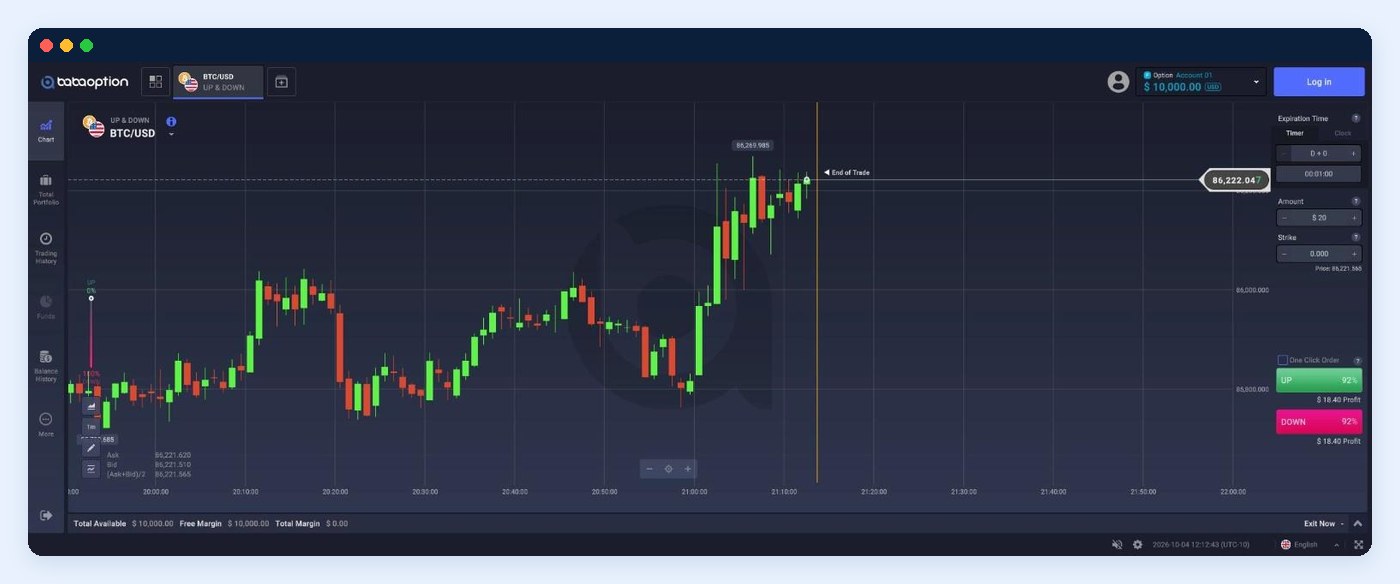
The screen is split into three clear zones:
- Left menu: Chart, Total Portfolio, Trading History, Funds, Balance History and More.
- Centre: the candlestick chart with the live Ask, Bid and mid price, a sentiment gauge and the expiry line.
- Right panel: expiry, amount, strike and the UP and DOWN buttons, each showing the payout and the profit in dollars.
A status bar along the bottom shows Total Available, Free Margin and Total Margin, so you always know how much of your balance is tied up in open trades.
Placing a Trade, Step by Step
- Pick the asset from the tabs at the top or the asset selector on the chart. The payout for each asset is shown in the list.
- Choose the expiry. Timer sets a duration (from 5 seconds); Clock lets you choose an exact closing time.
- Enter the amount. The minimum is $1 on USD, USDT and USDC accounts.
- Set the strike or leave it at the current price.
- Press UP or DOWN. The button already tells you the payout and the profit, and you can switch on a confirmation pop-up or One Click Order.
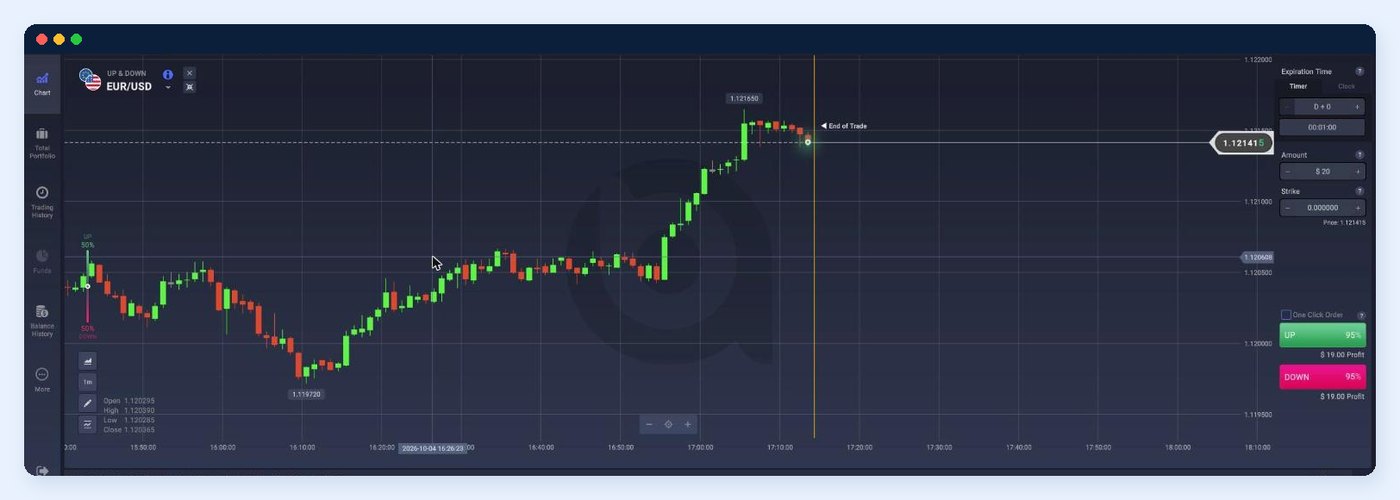
The Strike Price: BABA Trader’s Best Feature
On most binary options platforms your trade always opens at the current price. BABA Trader lets you move the strike up or down with the plus and minus buttons. The payout updates instantly: the side that becomes harder to win pays more, and the easier side pays less.
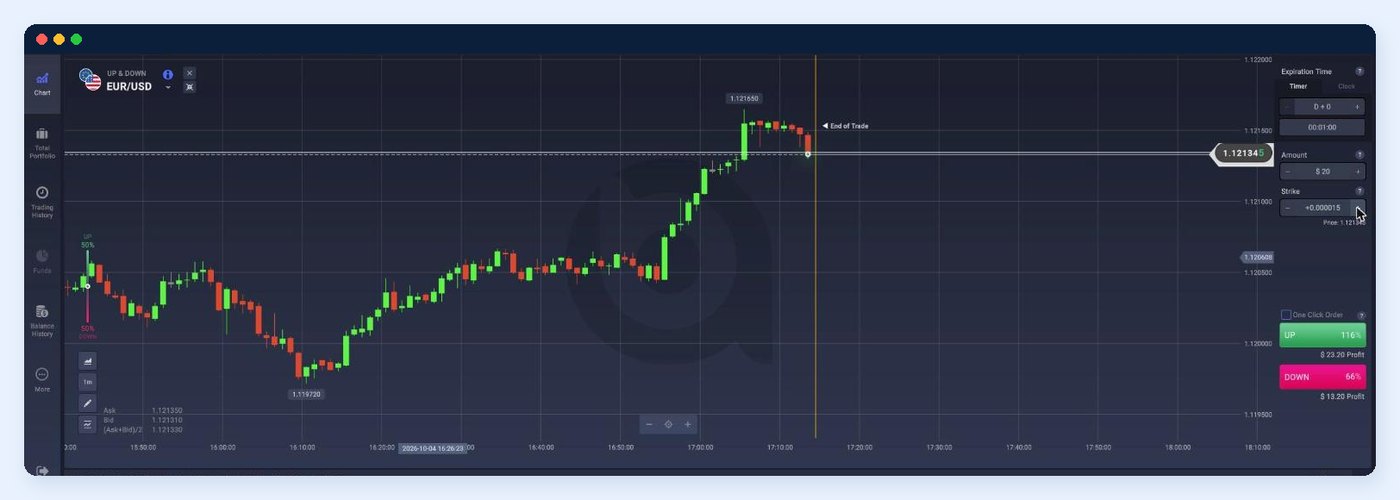
In practice this lets you choose between a safer trade with a smaller payout and a riskier trade with a bigger one. It is powerful, but we recommend learning it on the demo first. Our payouts guide shows the maths.
Option Types
| Option type | What you predict | Where it is available (Oct 2026) |
|---|---|---|
| Up & Down | Price higher or lower than the strike at expiry | Demo and Live |
| Up & Down: Out of the Money | Higher or lower than a distant strike you choose | Preview only (upcoming) |
| Touch / No Touch | Price touches a target level before expiry, or not | Preview only (upcoming) |
| In & Out Ends | Price ends inside or outside a range | Preview only (upcoming) |
| In & Out Stay | Price stays inside or outside a range all the time | Preview only (upcoming) |
Today, Up & Down is the product you can trade with real money. The other types, which carry the advertised payouts of up to 888%, can already be explored in Preview mode and will arrive in Demo and Live accounts later, according to the Help Center.
Charts, Indicators and Multi-Chart Layouts
Charting is a strong point. You can add indicators such as RSI and the Stochastic Oscillator below the price, each with its own settings, and draw trend lines directly on the chart. The layout button switches between 1, 2, 3, 4, 6 and 9 charts, and every chart keeps its own asset, timeframe, indicators and order access. When a market is closed, the chart shows a countdown to the next open.
Web, Desktop and Mobile Versions
| Version | Requirements | How to get it |
|---|---|---|
| Web terminal | Any modern browser | No installation |
| Desktop app | Windows 10+ (64-bit), macOS 11+ | Download from the website |
| Android app | Android 8.0+ | Google Play or APK |
| iPhone / iPad | iOS 14+, iPhone 11 or newer | Web app via Safari > Add to Home Screen |
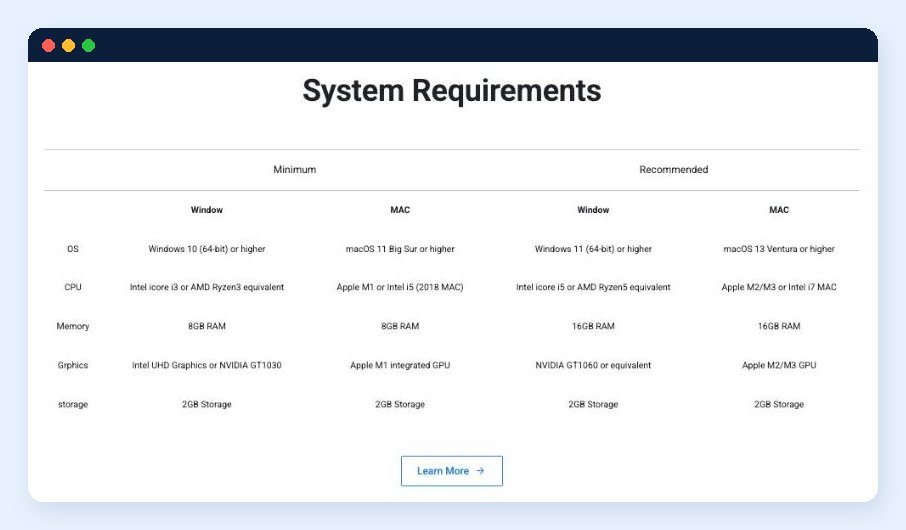
The desktop app needs at least 8 GB of RAM (16 GB recommended) and 2 GB of storage, so it is aimed at reasonably modern computers. If yours is older, the web terminal offers the same features. Your trades and balances sync across every version.
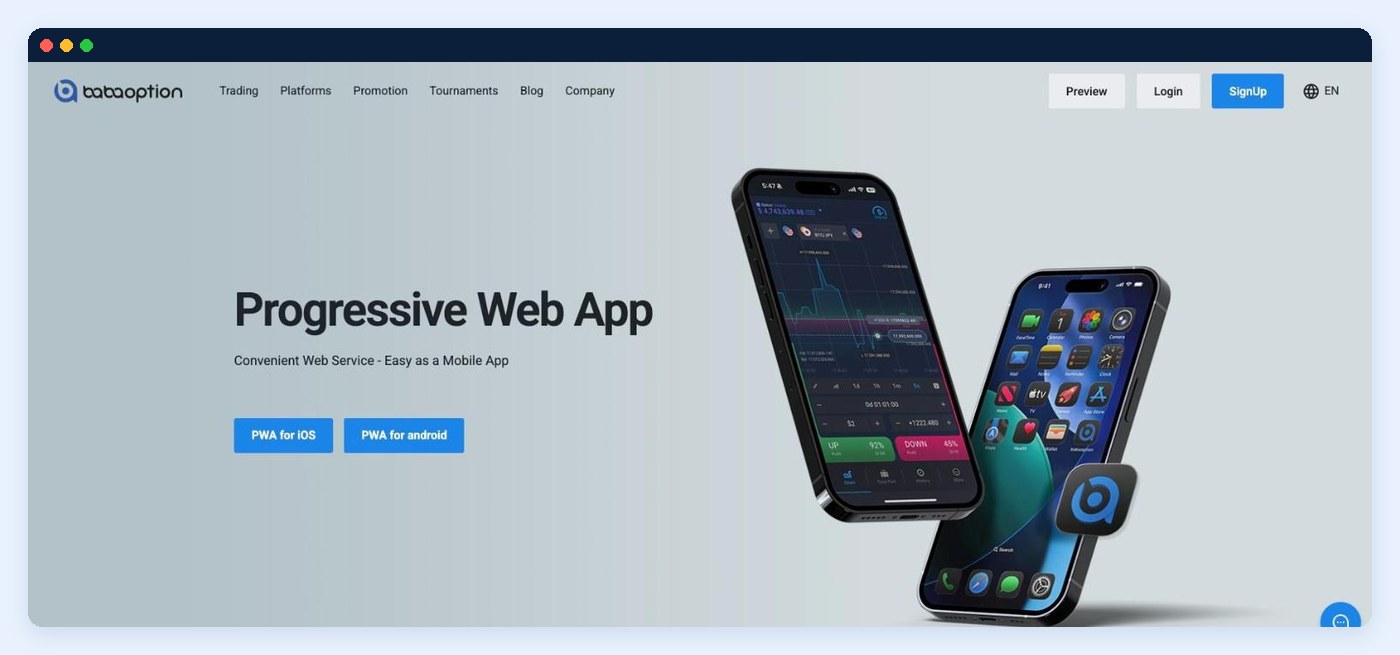
Step-by-step install instructions are in our Baba Option app download guide.
Platform Pros and Cons
What we like
- Preview mode lets anyone test it without registering
- Custom strike price with instant payout updates
- Payout and profit shown on the buttons before you trade
- Up to 9 charts, each with its own order access
- Same experience on web, desktop and mobile
What to watch out for
- No native App Store app (iPhone uses a web app)
- Desktop app needs 8 GB RAM or more
- Higher-payout option types are not live yet
- 5-second expiries can tempt beginners to overtrade
FAQ
What platform does Baba Option use?
Baba Option uses BABA Trader, available as a web terminal, a Windows and macOS desktop app, an Android app and an iPhone web app.
Can I try the Baba Option platform without signing up?
Yes. The Preview button opens the full platform with $10,000 in virtual funds, no registration needed.
What is the shortest expiry on Baba Option?
Using the Timer, expiries start from 5 seconds. You can also choose an exact closing time with the Clock.
Can I change the strike price on Baba Option?
Yes. You can move the strike above or below the current price, and the payout on both buttons updates automatically.
How many charts can I open?
Up to nine charts at once, in layouts of 1, 2, 3, 4, 6 or 9.
Verdict
BABA Trader is fast, clear and flexible. The custom strike price and the up-front payout display give you more control than most rival platforms, and the Preview mode means you can judge it yourself in seconds.
Affiliate disclosure: Baba Option Guide may earn a commission when you open an account through links on this page, at no extra cost to you. Facts were checked on the official websites in October 2026 and can change, so always confirm conditions before you trade. Binary options are not available in every country; see Investor.gov for an independent explanation of how they work.